
How it fits together
A plain-language tour of a METAFILES site, from the edge where users arrive to the storage that keeps three copies of every file.
A METAFILES site is a small cluster of servers, each with a clear job, plus a control plane that builds and watches it. This page walks through the parts in plain words. For more depth, see the architecture page.
The tiers
| Tier | What runs there | How it stays up |
|---|---|---|
| Edge | The secure entry point for every portal. Traffic reaches the site through an encrypted tunnel, so the site opens no inbound web ports. Only known addresses and routes are let in; everything else is refused. | Two connectors, one on each app server; either one can carry the traffic alone. |
| App tier | A pair of app servers. Each runs every organisation's portal, the load balancer, the database cluster, the cache and the storage engine. | Portals run on both app servers at once. If an app server fails, the shared site address moves to the other one automatically. The engine runs on one server with a standby on the other. |
| Office and Talk tier | A pair of office servers running Collabora Online for documents and the Talk services for calls, plus the site's monitoring. | Either office server can serve Office and calls on its own. |
| Storage tier | Three storage servers forming a Ceph cluster, plus the site's secret vault and internal certificate authority. | Every piece of data is stored three times, once on each storage server, on encrypted disks. If one server is down, the other two keep serving. |
| Control plane | A separate system outside the site. It builds new organisations, carries out machine actions that an operator approved, and checks the site's health every 10 minutes. | Users never depend on it while they work. If it is unavailable, files, sign-ins and calls carry on; only new builds and machine actions wait. |
The path of one file
When a user saves a file, from the browser or a METAFILES client:
- The request arrives at the organisation's address,
https://<organisation>.dmsvault.cloud, and passes the edge. If the organisation is suspended, the edge answers with the "suspended" page; if it is read-only, writes are refused here. - The load balancer hands it to the organisation's portal on either app server.
- The portal stores the file through the engine's S3 gateway. The portal never talks to the storage cluster directly.
- The engine splits the file into chunks, stores identical chunks only once, compresses them and encrypts them with the organisation's own key. It checks the quota, WORM, legal hold and ransomware protection on the way.
- The encrypted data is written to the organisation's storage target. On the site's own storage, that means three copies on three storage servers.
- Only when the write is safely recorded does the engine confirm it, and the user sees the file.
Downloading runs the same way in reverse: the engine reads the encrypted data, decrypts it and hands the file to the portal.
Editing a document
When a user opens a Word, Excel or PowerPoint file, the portal opens Collabora Online on one of the office servers. Everyone editing the same document is sent to the same office server so they see each other's changes. When the document is saved, it goes back through the portal and the engine like any other file, as a new version.
Calls
Talk sets up calls through a signalling service on the office servers. Media for group calls passes through a media server there. When people cannot connect to each other directly, for example from home networks, a TURN relay carries the audio and video. The site has a private relay for people on the local network and two public relays for everyone else.
How a new organisation is built
The MSP fills in Add organisation in the console. That is a request. The control plane picks it up and builds everything the organisation needs in 12 steps: its database and cache, its Office and Talk entries, its own encrypted space in the engine, its portal on both app servers, its branding and apps, its console controls, its route through the load balancer, its public address, its first admin account and, last, an isolation check that proves it cannot see other organisations. The console shows every step live. See Organisations for the details.
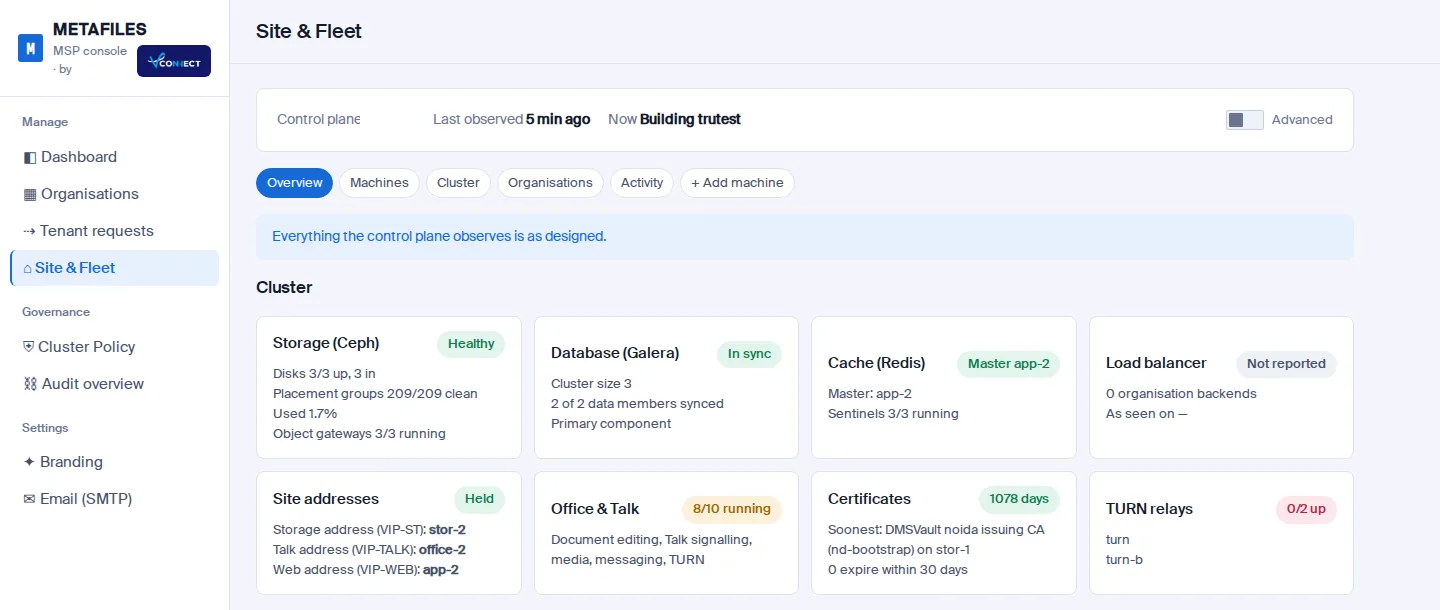 Site & Fleet shows what the control plane sees on every machine of the site.
Who controls what
| Who | Controls |
|---|---|
| The MSP | Every organisation's plan, policy, apps, branding, data protection and life cycle, and the site's machines. Every action goes through the engine, which records and audits it. The console itself never logs in to a server. |
| The control plane | Builds, deletes and machine actions, only from signed and verified releases, and only after a person asked for them. |
| Organisation admins | Their own portal: users, groups, sharing, branding and more. If they change a setting the MSP has locked, the MSP's value is put back automatically. See What your MSP controls. |
| End users | Their own files, shares, devices and security settings. |
Read on: Architecture, Security, Scaling and high availability.