
Blog / 6 November 2026
Your files, your storage: per-customer storage targets
Choose for each organisation where its files live, from the site's own storage to the customer's own S3 server. The engine still encrypts every byte.
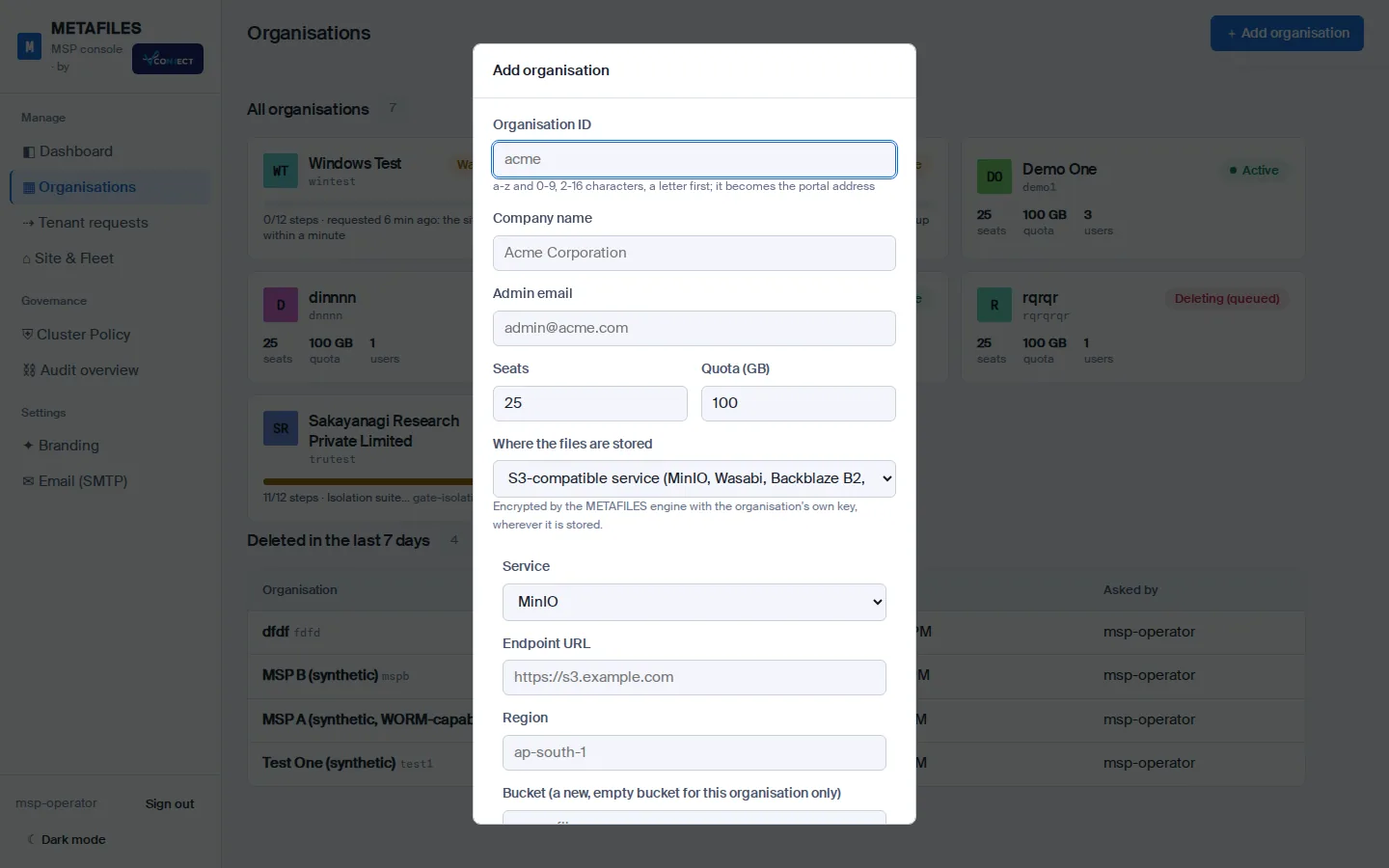
Some customers want their files on the MSP's platform. Others already pay for Amazon S3, or have a storage server in their own building and want their data to stay there. From today, the MSP chooses where each organisation's files are stored when it creates the organisation.
Four places to put an organisation
| Choice | For |
|---|---|
| This site's storage (default) | The site's own storage cluster, three copies of everything |
| Amazon S3 | An S3 bucket in the region you pick, with optional server-side encryption and Object Lock |
| An S3-compatible service | Presets for MinIO, Wasabi, Backblaze B2, Cloudflare R2, Google Cloud Storage and Ceph, or any other S3 endpoint |
| The customer's own server | An S3-compatible server on the customer's premises, such as MinIO, Ceph or a NAS with S3 |
The storage choice in the Add organisation form.
The engine still owns the data
The storage is only a backend. Nothing writes to the bucket except DMSVault's storage engine, and the engine encrypts and compresses every chunk with the organisation's own key before it leaves. A customer's bucket only ever holds encrypted packs; the files, their versions and their WORM state are managed by the engine exactly as they are on the site's own storage.
Test before you build
A Test connection button runs a short probe from the engine: it checks the address, makes sure the bucket is empty of engine data, writes a small random object, reads it back, deletes it by version, and, if you asked for WORM, reads the bucket's Object Lock settings. Each step reports the store's own message and a hint. Create runs the same probe again and refuses to build if it fails.
Safe by default
- HTTPS only, with certificate checks that cannot be switched off; a private CA can be added for an on-premises server.
- No surprises in the address. Loopback, link-local, cloud metadata and the site's own internal addresses are refused.
- One bucket, one organisation. A bucket already used by another organisation is refused.
- The access key is handed over once and kept only by the engine, never in a log or a console answer.
- WORM needs Object Lock, so a WORM-capable organisation can only use a store that has it.
Good to know
- The choice is fixed when the organisation is created.
- If a customer's own server goes down, only that organisation is affected.
- The daily backup still copies the organisation to the site's own backup storage.
Read more in Storage choices and Organisations in the MSP console.